
6-Vulnerable and Outdated Components
Description
You are likely vulnerable:
- If you do not know the versions of all components you use (both client-side and server-side). This includes components you directly use as well as nested dependencies.
- If the software is vulnerable, unsupported, or out of date. This includes the OS, web/application server, database management system (DBMS), applications, APIs and all components, runtime environments, and libraries.
- If you do not scan for vulnerabilities regularly and subscribe to security bulletins related to the components you use.
- If you do not fix or upgrade the underlying platform, frameworks, and dependencies in a risk-based, timely fashion. This commonly happens in environments when patching is a monthly or quarterly task under change control, leaving organizations open to days or months of unnecessary exposure to fixed vulnerabilities.
- If software developers do not test the compatibility of updated, upgraded, or patched libraries.

Example Attack Scenarios
Scenario #1: Components typically run with the same privileges as the application itself, so flaws in any component can result in serious impact. Such flaws can be accidental (e.g., coding error) or intentional (e.g., a backdoor in a component). Some example exploitable component vulnerabilities discovered are:
- CVE-2017-5638, a Struts 2 remote code execution vulnerability that enables the execution of arbitrary code on the server, has been blamed for significant breaches.
- While the internet of things (IoT) is frequently difficult or impossible to patch, the importance of patching them can be great (e.g., biomedical devices).
There are automated tools to help attackers find unpatched or misconfigured systems. For example, the Shodan IoT search engine can help you find devices that still suffer from Heartbleed vulnerability patched in April 2014.
7-Identification and Authentication Failures
Description
Confirmation of the user’s identity, authentication, and session management is critical to protect against authentication-related attacks. There may be authentication weaknesses if the application:
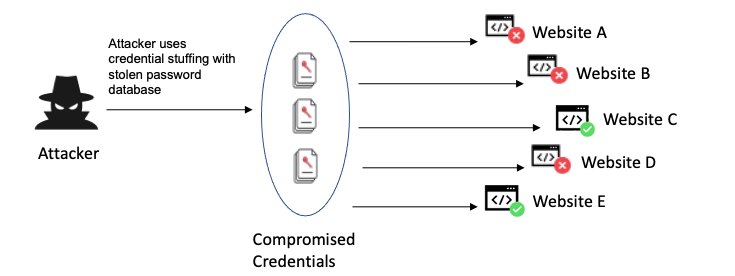
- Permits automated attacks such as credential stuffing, where the attacker has a list of valid usernames and passwords.
- Permits brute force or other automated attacks.
- Permits default, weak, or well-known passwords, such as “Password1” or “admin/admin”.
- Uses weak or ineffective credential recovery and forgot-password processes, such as “knowledge-based answers,” which cannot be made safe.
- Uses plain text, encrypted, or weakly hashed passwords data stores
- Has missing or ineffective multi-factor authentication.
- Exposes session identifier in the URL.
- Reuse session identifier after successful login.
- Does not correctly invalidate Session IDs. User sessions or authentication tokens (mainly single sign-on (SSO) tokens) aren’t properly invalidated during logout or a period of inactivity
Example Attack Scenarios
Scenario #1: Credential stuffing, the use of lists of known passwords, is a common attack. Suppose an application does not implement automated threat or credential stuffing protection. In that case, the application can be used as a password oracle to determine if the credentials are valid.
Scenario #2: Most authentication attacks occur due to the continued use of passwords as a sole factor. Once considered best practices, password rotation and complexity requirements encourage users to use and reuse weak passwords. Organizations are recommended to stop these practices per NIST 800-63 and use multi-factor authentication.
Scenario #3: Application session timeouts aren’t set correctly. A user uses a public computer to access an application. Instead of selecting “logout,” the user simply closes the browser tab and walks away. An attacker uses the same browser an hour later, and the user is still authenticated.
8-Software and Data Integrity Failures
Description
Software and data integrity failures relate to code and infrastructure that does not protect against integrity violations. An example of this is where an application relies upon plugins, libraries, or modules from untrusted sources, repositories, and content delivery networks (CDNs). An insecure CI/CD pipeline can introduce the potential for unauthorized access, malicious code, or system compromise. Lastly, many applications now include auto-update functionality, where updates are downloaded without sufficient integrity verification and applied to the previously trusted application. Attackers could potentially upload their own updates to be distributed and run on all installations. Another example is where objects or data are encoded or serialized into a structure that an attacker can see and modify is vulnerable to insecure deserialization

Example Attack Scenarios
Scenario #1 Update without signing: Many home routers, set-top boxes, device firmware, and others do not verify updates via signed firmware. Unsigned firmware is a growing target for attackers and is expected to only get worse. This is a major concern as many times there is no mechanism to remediate other than to fix in a future version and wait for previous versions to age out.
Scenario #2 SolarWinds malicious update: Nation-states have been known to attack update mechanisms, with a recent notable attack being the SolarWinds Orion attack. The company that develops the software had secure build and update integrity processes. Still, these were able to be subverted, and for several months, the firm distributed a highly targeted malicious update to more than 18,000 organizations, of which around 100 or so were affected. This is one of the most far-reaching and most significant breaches of this nature in history.
Scenario #3 Insecure Deserialization: A React application calls a set of Spring Boot microservices. Being functional programmers, they tried to ensure that their code is immutable. The solution they came up with is serializing the user state and passing it back and forth with each request. An attacker notices the “rO0” Java object signature (in base64) and uses the Java Serial Killer tool to gain remote code execution on the application server.
9-Security Logging and Monitoring Failures
Description
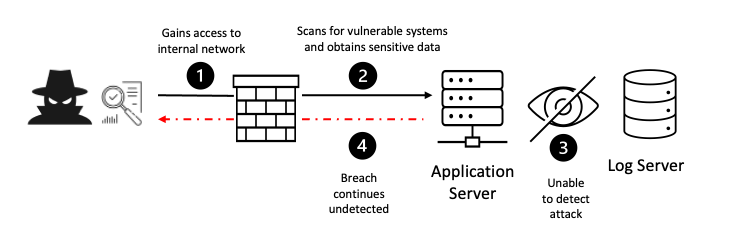
Returning to the OWASP Top 10 2021, this category is to help detect, escalate, and respond to active breaches. Without logging and monitoring, breaches cannot be detected. Insufficient logging, detection, monitoring, and active response occurs any time:
- Auditable events, such as logins, failed logins, and high-value transactions, are not logged.
- Warnings and errors generate no, inadequate, or unclear log messages.
- Logs of applications and APIs are not monitored for suspicious activity.
- Logs are only stored locally.
- Appropriate alerting thresholds and response escalation processes are not in place or effective.
- Penetration testing and scans by dynamic application security testing (DAST) tools (such as OWASP ZAP) do not trigger alerts.
- The application cannot detect, escalate, or alert for active attacks in real-time or near real-time.
You are vulnerable to information leakage by making logging and alerting events visible to a user or an attacker
Example Attack Scenarios
Scenario #1: A children’s health plan provider’s website operator couldn’t detect a breach due to a lack of monitoring and logging. An external party informed the health plan provider that an attacker had accessed and modified thousands of sensitive health records of more than 3.5 million children. A post-incident review found that the website developers had not addressed significant vulnerabilities. As there was no logging or monitoring of the system, the data breach could have been in progress since 2013, a period of more than seven years.
Scenario #2: A major Indian airline had a data breach involving more than ten years’ worth of personal data of millions of passengers, including passport and credit card data. The data breach occurred at a third-party cloud hosting provider, who notified the airline of the breach after some time
.Scenario #3: A major European airline suffered a GDPR reportable breach. The breach was reportedly caused by payment application security vulnerabilities exploited by attackers, who harvested more than 400,000 customer payment records. The airline was fined 20 million pounds as a result by the privacy regulator
10-Server-Side Request Forgery (SSRF)
Description
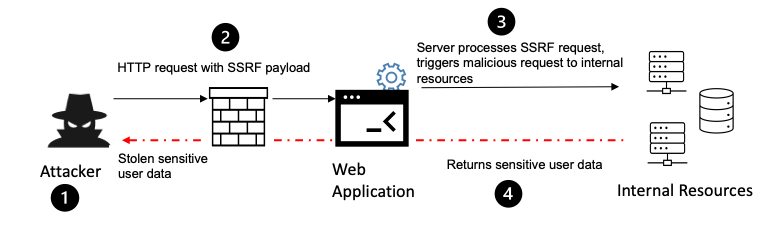
SSRF flaws occur whenever a web application is fetching a remote resource without validating the user-supplied URL. It allows an attacker to coerce the application to send a crafted request to an unexpected destination, even when protected by a firewall, VPN, or another type of network access control list (ACL).
As modern web applications provide end-users with convenient features, fetching a URL becomes a common scenario. As a result, the incidence of SSRF is increasing. Also, the severity of SSRF is becoming higher due to cloud services and the complexity of architectures
Example Attack Scenarios
Attackers can use SSRF to attack systems protected behind web application firewalls, firewalls, or network ACLs, using scenarios such as:
Scenario #1: Port scan internal servers – If the network architecture is unsegmented, attackers can map out internal networks and determine if ports are open or closed on internal servers from connection results or elapsed time to connect or reject SSRF payload connections.
Scenario #2: Sensitive data exposure – Attackers can access local files or internal services to gain sensitive information such as file:///etc/passwd</span> and http://localhost:28017/.
Scenario #3: Access metadata storage of cloud services – Most cloud providers have metadata storage such as http://169.254.169.254/. An attacker can read the metadata to gain sensitive information.
Scenario #4: Compromise internal services – The attacker can abuse internal services to conduct further attacks such as Remote Code Execution (RCE) or Denial of Service (DoS).

Leave a Reply